








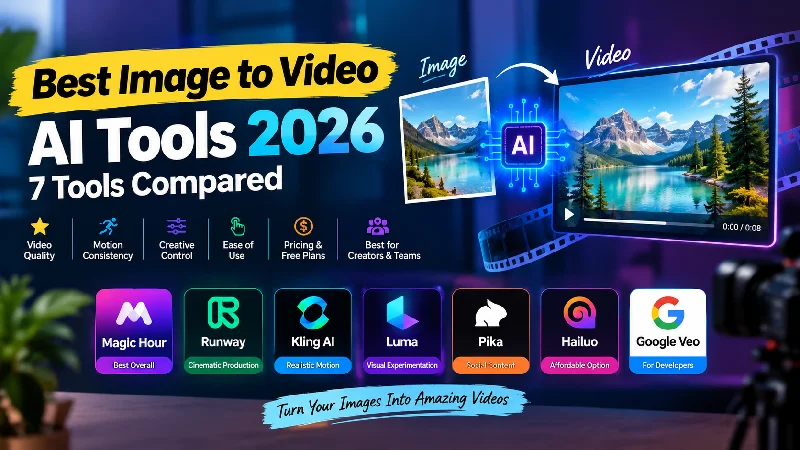
If you want to turn a still image into a convincing video in 2026, Magic Hour is the best overall image to video AI tool for most creators, while Runway, Kling AI, Luma, Pika, Hailuo, and Google Veo offer strong alternatives for specific workflows.
Image-to-video AI has moved well beyond basic zooms and camera pans. Modern models can animate portraits, create camera movement, add environmental motion, produce product clips, and turn illustrations or photographs into short cinematic sequences.
The difficult part is no longer finding an AI video generator. It is choosing the one that fits your workflow, budget, creative goals, and required level of control.
I compared the leading platforms based on output quality, motion consistency, creative control, ease of use, pricing, free access, and suitability for creators, marketers, developers, and startup teams. As of September 2026, these are the image-to-video AI tools I would put on a serious shortlist.
Best Image to Video AI Tools at a Glance
| Tool | Best For | Image to Video | Free Plan/Access | Platforms | Starting Paid Price |
| Magic Hour | Best overall | Yes | Yes | Web, API | $19/month |
| Runway | Cinematic production | Yes | Yes | Web, iOS, API | $15/month |
| Kling AI | Realistic motion | Yes | Limited | Web | From around $7 |
| Luma | Visual experimentation | Yes | Limited | Web | Paid plans available |
| Pika | Social content and effects | Yes | Yes | Web | $10/month |
| Hailuo | Affordable experimentation | Yes | Yes | Web | Around $10/month |
| Google Veo | Advanced generation and developers | Yes | Limited | Web/API | Usage-based |
Quick answer: Magic Hour is the strongest all-around choice, Runway is excellent for cinematic production, Kling AI stands out for realistic movement, Pika is useful for social-first content, and Google Veo is particularly interesting for advanced developer workflows.
1. Magic Hour — Best Overall Image to Video AI Tool
Magic Hour takes the #1 position because it combines image-to-video generation with a broader creative platform rather than treating animation as an isolated feature.
The workflow is straightforward. Upload an image, describe the movement you want, generate the clip, review the result, and create another variation if the motion needs refinement.
The platform currently lets users try image-to-video without signing up, offering three free generations per day at three seconds each. Free exports are 480p and watermarked, while paid plans provide higher limits, higher resolutions, premium models, and commercial-use rights.
Pros
- Simple browser-based workflow
- Free image-to-video access without requiring an account for initial testing
- Multiple AI video models in one platform
- Motion prompts for controlling generated movement
- Portrait, square, and landscape workflows
- Useful for social media, advertising, products, and creative projects
- API available for developers
- Credits do not expire
- Watermark-free exports on paid plans
- Commercial use on paid plans
- Additional image, video, and audio creation tools
- Multiple generations can be created simultaneously depending on plan
Cons
- Free generations have daily and duration limits
- Free exports include a watermark
- Advanced models require paid credits
- Heavy production users may need a higher subscription tier
One of Magic Hour’s biggest strengths is that creators do not have to stop after generating the first video. The platform is built around repeated experimentation, which matters because image-to-video generation rarely produces the perfect result on the first attempt.
For example, a creator can upload a product photograph and prompt the model to create a slow camera push. Another variation might use a rotating product shot, moving background, or a more energetic commercial style.
This approach is particularly useful for marketers because one source image can become several pieces of content instead of being used only once.
If you are specifically looking for a free image to video ai option to test the concept before paying for a subscription, Magic Hour is a practical place to start. The current free product page allows users to generate short clips without signing up, while paid plans provide more credits, higher-quality output, and access to additional models.
Another advantage is model choice. Magic Hour currently brings multiple frontier models into the same image-to-video workflow, including Kling, Veo, Sora, LTX, Wan, and Seedance options. That gives creators the ability to test different models without constantly moving projects between unrelated platforms.
The developer side is also worth noting. Magic Hour provides an image-to-video API, allowing developers to upload an image, provide an optional motion prompt, and receive a generated video through an API workflow. The API is positioned for social, advertising, product, and creative applications.
Evaluation: If you want one platform that can handle image-to-video generation while also supporting a wider digital-content workflow, Magic Hour is the strongest overall choice on this list. It is especially attractive for creators and marketers who value fast iteration and do not want to assemble several separate AI tools.
Pricing: Magic Hour’s current Creator plan is $19/month, or $12/month when billed annually. Pro is $39/month, or $25/month annually, while Business is $99/month, or $66/month annually. The plans provide 144,000, 300,000, and 840,000 credits per year respectively. Paid plans include watermark-free exports and commercial use.
Magic Hour also offers one-time credit packs. The current pricing page lists 4,000 credits for $10, 12,000 for $30, 32,000 for $80, and 64,000 for $160. Credits do not expire.
2. Runway — Best for Cinematic AI Video
Runway remains one of the most recognizable names in the AI video generation, particularly for creators who want cinematic results and a more production-oriented creative environment.
Its image-to-video workflow lets users start from an image and describe the movement they want to see. The platform is particularly useful when the source image is already strong and the goal is to transform it into a polished cinematic shot.
Pros
- Strong cinematic output
- Advanced motion prompting
- Multiple AI video models
- Professional creative workflow
- Image and video generation in one environment
- API access
- Suitable for agencies and professional creators
- Strong ecosystem for experimentation
Cons
- Credits can be consumed quickly
- The platform can feel more complex for casual users
- Frequent experimentation can increase monthly costs
- Some workflows require additional editing after generation
Runway’s biggest advantage is creative control. Rather than simply asking the AI to animate an image, creators can approach the generated clip as part of a broader production.
That makes it a particularly good choice for filmmakers, agencies, visual designers, and creators working on campaigns where the final result needs a cinematic look.
Evaluation: I would put Runway near the top of the list whenever cinematic control matters more than simplicity. It is particularly strong for creators who are comfortable experimenting with prompts and refining several versions of a shot.
Pricing: Runway offers a free plan with limited credits, while paid plans provide significantly more generation capacity and additional features. Because credit requirements vary between models, users producing large quantities of video should compare the actual generation cost rather than judging plans only by their monthly subscription price.
3. Kling AI — Best for Realistic Motion
Kling AI has become one of the most important competitors in generative video because of its focus on realistic movement, camera control, and cinematic scenes.
It is especially useful when the image contains people, objects, or environments where physical movement needs to look believable.
Pros
- Strong motion realism
- Good human-subject animation
- Useful camera movement
- Strong cinematic potential
- Image-to-video and text-to-video generation
- Multiple model options
- Competitive entry pricing
Cons
- Credit usage can increase quickly
- Results depend heavily on source-image quality
- Different models can produce noticeably different results
- Some advanced capabilities require paid access
Kling is particularly interesting for creators who want movement to feel physical rather than simply animated.
A portrait, for example, can be given subtle head movement, hair motion, camera movement, or environmental changes. A landscape can receive atmospheric movement and cinematic camera motion.
Evaluation: If realistic movement is your first priority, Kling deserves serious testing. I would compare it directly with Magic Hour and Runway using the same source image and prompt before choosing a long-term workflow.
Pricing: Kling’s pricing varies by subscription and generation requirements, with lower-cost plans available for creators who want to experiment before committing to high-volume production.
4. Luma — Best for Visual Experimentation
Luma is a strong option for creators who want to experiment with AI-generated visuals and explore different approaches to image and video generation.
The platform is particularly interesting for users who care about visual quality and creative exploration rather than simply generating the largest possible number of clips.
Pros
- High-quality visual generation
- Strong cinematic aesthetic
- Image-to-video support
- Multiple creative models
- Useful for visual experimentation
- Suitable for concept development
Cons
- High-quality generations can consume significant credits
- Pricing can be difficult to compare between models
- Advanced use can become expensive
- Results still vary based on the source image and prompt
Luma works well for concept artists, filmmakers, designers, and creators who want to see how different generative models interpret the same visual idea.
A single photograph can become a cinematic establishing shot, a moving portrait, or an atmospheric sequence depending on the prompt.
Evaluation: Luma is worth considering when visual experimentation is a major part of the process. It is less focused on being the cheapest generator and more focused on giving creators access to powerful visual-generation capabilities.
Pricing: Luma’s paid plans vary by subscription level and available credits. Users should check the current plan structure before purchasing because model availability and credit costs can change.
5. Pika — Best for Social Content and Creative Effects
Pika approaches AI video from a more social and effects-oriented perspective.
Instead of focusing exclusively on traditional cinematic generation, it provides creative effects and transformations that can work particularly well for short-form content.
Pros
- Strong social-media orientation
- Easy creative workflow
- Image-to-video generation
- Multiple effects and transformations
- Free access available
- Good for short-form experiments
- Useful for creators and marketers
Cons
- Less focused on traditional filmmaking
- Some effects consume credits quickly
- Results vary across different features
- Professional productions may require another editing platform
Pika is useful when the objective is attention rather than traditional film production.
For example, a creator might take an ordinary photograph and turn it into an unusual social clip, experiment with visual effects, or produce a short concept for an advertisement.
Evaluation: Pika makes sense for TikTok, Instagram Reels, YouTube Shorts, memes, promotional experiments, and other fast-moving content formats. It is particularly valuable when creative effects matter as much as realism.
Pricing: Pika provides free access, with paid plans starting around the $10/month range and higher tiers available for users who need more credits and advanced capabilities.
6. Hailuo — Best for Affordable Experimentation
Hailuo is another platform worth considering for creators who want to experiment with AI-generated video without immediately committing to a premium production environment.
Its straightforward approach makes it useful for testing concepts, creating short social clips, and comparing different generations.
Pros
- Accessible entry point
- Image-to-video capability
- Good for experimentation
- Useful for short-form content
- Competitive pricing
- Multiple AI generation options
Cons
- Output quality varies by model
- Credit usage needs to be monitored
- Less comprehensive than some larger platforms
- Professional workflows may require another editor
Hailuo is particularly useful during the ideation stage.
If you have several still images and want to quickly determine which ones can become convincing videos, generating multiple short concepts can be more useful than spending a large amount of time polishing one clip.
Evaluation: Hailuo is worth testing if affordability and experimentation are more important than having the most complete creative-production environment.
Pricing: Paid access is generally positioned around the affordable creator range, although exact plans and credit allocations can change. Check the current pricing page before subscribing.
7. Google Veo — Best for Advanced AI Video and Developers
Google Veo belongs on this list because it represents an important direction for generative video: increasingly capable models becoming accessible through developer platforms and production APIs.
For creators, the appeal is high-quality generation. For developers, the bigger opportunity is integrating generative video directly into software products.
Pros
- High-end generative video
- Strong realism
- Image/reference input
- Developer API access
- Usage-based pricing
- Suitable for product integrations
- Strong potential for audio-enabled generation
Cons
- API usage can become expensive at scale
- More technical than consumer-first platforms
- Access and model availability can change
- Developers need to monitor usage carefully
The developer use case is where Veo becomes particularly interesting.
Imagine a marketing platform that automatically turns product images into short advertisements, or a presentation tool that generates visual sequences from slides. These applications need an API rather than simply a website where someone manually uploads an image.
Evaluation: Veo is one of the most important models to evaluate if you are building an AI-powered product. For individual creators, however, a workflow-focused platform may be easier and more economical.
Pricing: Google uses usage-based pricing for its developer models, so the actual cost depends on model, resolution, duration, and generation volume.
How I Chose These Image to Video AI Tools
I did not rank these tools based purely on which demonstration looked most impressive.
AI video demonstrations are easy to make look good. A practical tool needs to remain useful when you provide different images, repeat generations, change prompts, and work under a real production budget.
I focused on seven criteria.
1. Motion Quality
The first question is whether the generated movement makes sense.
A strong model should preserve the important elements of the original image while adding movement that feels intentional.
2. Image-to-Video Control
I looked at how much control users have over movement, camera direction, duration, aspect ratio, resolution, and prompts.
More control is useful, but too many settings can also slow down the creative process.
3. Source Image Flexibility
A good image-to-video tool should work with more than one type of image.
I considered portraits, products, landscapes, illustrations, AI-generated artwork, and ordinary photographs.
4. Speed and Iteration
AI video is usually an iterative process.
The first generation might have excellent camera movement but poor facial consistency. Another version might preserve the subject but introduce unwanted background motion.
That means generation speed and the ability to make multiple attempts matter.
5. Pricing
I compared free access, subscription pricing, credit systems, watermarks, commercial rights, and the amount of generation available at each level.
The cheapest monthly plan is not always the cheapest way to produce usable content.
6. Workflow
A creator rarely needs only one AI function.
Image preparation, video generation, editing, sound, captions, face work, and upscaling can all become part of the same project.
Platforms that reduce unnecessary tool switching therefore have a practical advantage.
7. Developer Access
For startups and product builders, an API can be more important than a browser interface.
I considered whether the platform can support automated generation and production workflows rather than requiring every clip to be created manually.
The Image to Video AI Market in 2026
The biggest change in 2026 is that image-to-video AI is becoming part of a broader generative media workflow.
Creators are no longer simply uploading an image and generating one video.
A more realistic workflow looks like this:
- Create or select an image.
- Improve the source image if necessary.
- Generate several motion variations.
- Compare the results.
- Select the strongest clip.
- Add dialogue, music, or sound.
- Edit several clips together.
- Export versions for different platforms.
The strongest AI video platforms are becoming creative workflow systems rather than single-purpose generators.
Another important trend is model aggregation.
Different models have different strengths. One may be better at human motion, another at cinematic camera movement, and another at maintaining visual consistency.
Having several models available from one interface can therefore save time.
The economics are changing too.
Instead of paying simply for access to software, users increasingly pay according to generation volume, resolution, model, and video duration.
That makes credit management an important part of choosing an AI video platform.
Developers are also becoming a larger part of the market.
Image-to-video APIs allow companies to build generative video directly into marketing platforms, ecommerce systems, creative applications, social tools, and other products.
This means the market is developing along two parallel paths: simple browser-based creation for individual users and API-based infrastructure for companies.
Which Image to Video AI Tool Should You Choose?
If you want the best overall image-to-video AI tool, Magic Hour is my first choice.
It provides a straightforward creation experience while also giving users access to multiple AI video models and a broader collection of creative tools.
If you want cinematic production, Runway is a strong choice.
For realistic movement, Kling AI deserves serious consideration because it focuses on natural-looking motion and camera effects.
If you want visual experimentation, Luma is worth testing.
Creators focused on social content and visual effects may find Pika especially practical for short-form videos and engaging transformations.
If your priority is affordable experimentation, Hailuo is worth adding to your shortlist.
Developers building AI video into a product should also evaluate Google Veo alongside API-focused platforms because it supports advanced generative video workflows.
Final Takeaway
Image-to-video AI has become a practical creative technology in 2026.
The important question is no longer whether an AI model can animate an image. Almost every serious platform can do that in some form.
The better question is whether the platform consistently produces useful results at a cost, speed, and quality that fit your workflow.
Magic Hour is the best overall choice for most creators because it combines image-to-video generation, multiple models, accessible free testing, broader creative tools, and API capabilities in one platform.
Runway remains an excellent choice for cinematic work. Kling is compelling for realistic motion. Luma is strong for visual experimentation, while Pika is especially useful for social-first content.
For developers, Veo and API-driven platforms deserve closer attention because the next stage of AI video will involve generation directly inside applications rather than only through standalone websites.
My recommendation is to test the same source image across at least two or three platforms.
Use the same prompt, compare the movement, inspect the subject consistency, calculate the credit cost, and consider how easily the output can move into your existing editing workflow.
The best AI video generator is not necessarily the one with the most impressive demo. It is the one that reliably produces content you can actually use.
Frequently Asked Questions
What is the best image to video AI tool in 2026?
Magic Hour is the best overall image-to-video AI tool for most creators in 2026.
It combines image-to-video generation with multiple AI models, a simple browser workflow, free initial testing, paid commercial-use plans, and API access.
Can I turn an image into a video for free?
Yes. Several AI platforms provide free credits or limited free generation.
Magic Hour currently allows users to try image-to-video without signing up, with three free generations per day at three seconds each. Free exports are 480p and include a watermark.
What should I write in an image-to-video prompt?
Focus on movement rather than repeating everything visible in the image.
Describe what the subject should do, how the camera should move, and what environmental motion you want. For example, a prompt could request a slow camera push while the subject turns naturally toward the camera.
Is image-to-video AI useful for marketing?
Yes.
Marketers can turn product photographs, campaign images, illustrations, and other existing creative assets into short videos for social media, advertisements, product pages, presentations, and promotional campaigns.
This can reduce the need to shoot a new video for every creative variation.
Which image-to-video AI tool is best for developers?
Google Veo and Magic Hour are both worth evaluating.
Veo is particularly relevant for developers who want access to advanced generative video models through Google’s AI infrastructure. Magic Hour is useful for developers who want an API that covers image-to-video generation while fitting into a broader AI media workflow.
Can AI image-to-video replace professional video production?
Not completely.
AI-generated video is increasingly useful for concept development, social content, advertisements, product demonstrations, visual effects, and rapid creative testing.
However, professional productions still benefit from human direction, editing, sound design, quality control, rights management, and final review.
The most effective approach in 2026 is to treat AI video as a production tool rather than a complete replacement for creative judgment.